Cost breakdown
Material, energy, machine time, and labor before failure and margin
- Materialn/a
- Electricityn/a
- Machinen/a
- Laborn/a
- Othern/a
- Cost / part
- n/a
- Cost per part
- n/a
- Total job cost
- n/a
- Print time / part
- n/ah
- Filament weight
- n/ag
- Material cost
- n/a
- Electricity
- n/a
- Machine cost
- n/a
- Labor cost
- n/a
- Subtotal
- n/a
- Failure buffer
- n/a
You need a first-pass FDM quote before you hit Start or send a price to a customer. This pad takes slicer filament grams and print time (or a volume estimate when you have no gcode), then stacks material, electricity, machine hourly rate, prep and post labor, a failure buffer, and margin into cost per part and job total.
Defaults open on Slicer weight and time: PLA at 1200 /kg, 50 g, 3.0 h, 200 W, 7 /kWh, machine 10 /h, prep 10 min plus post 15 min at 200 /h, failure 10%, margin 0. CALCULATE returns material 60.00, electricity 4.20, machine 30.00, labor 83.33, subtotal 177.53, and job total about 195.29. Currency is whatever unit you type.
It lives under Manufacturing Calculators next to the machining cost calculator. Use slicer numbers for sellable quotes. Volume mode is a ballpark when you only have CAD volume.
Formula
- Material = (filament weight g / 1000) × price per kg × quantity.
- Electricity = (power W / 1000) × print hours × electricity rate /kWh × quantity.
- Machine = print hours × machine hourly rate × quantity (printer price ÷ expected print-life hours is a common way to set the rate).
- Labor = ((prep min + post min) / 60) × labor hourly rate × quantity.
- Subtotal = material + electricity + machine + labor + other (other is once per job).
- With failure = subtotal × (1 + failure%/100). Total job = with failure × (1 + margin%/100). Cost per part = total job ÷ quantity.
- Volume estimate: weight = volume × density. Length = volume / filament cross-section. Time ≈ (length / speed) × 1.07 × (0.2 / layer height).
Reproduce the default slicer quote on CALCULATE:
| Bucket | Inputs | Result |
|---|---|---|
| Material | 50 g × 1200 /kg | 60.00 |
| Electricity | 0.2 kW × 3 h × 7 | 4.20 |
| Machine | 3 h × 10 /h | 30.00 |
| Labor | 25 min × 200 /h | 83.33 |
| Subtotal | 60 + 4.20 + 30 + 83.33 | 177.53 |
| + 10% failure | 177.53 × 1.10 | ≈ 195.29 job total |
How it works
Paste filament grams and print time from your slicer, or estimate from part volume. Add electricity, machine hourly rate, prep and post labor, a failure buffer, and margin for a first-pass quote. Currency-neutral.
Pick Input mode: Slicer weight and time (default) or Estimate from volume. Choose a material preset to fill density and a suggested price /kg, then edit any field. In slicer mode enter filament grams, print hours, and extra minutes. Enter electricity, machine rate, prep and post minutes, labor rate, optional other cost, failure %, and margin. CALCULATE fills Results and the cost breakdown. Editing a field clears Results. RESET restores the 50 g / 3 h PLA quote defaults.
Slicer grams and hours beat CAD volume for quotes
For sellable quotes, start from slicer filament weight and print time. Those numbers already include infill, supports, brim, and real machine duration. CAD solid volume does not.
On this pad, leave Input mode on Slicer weight and time, paste grams and hours from your slicer, then CALCULATE. Switch to Estimate from volume only when you need a rough material check before slicing.
What each mode uses:
| Mode | Primary inputs | Best for |
|---|---|---|
| Slicer weight and time | g + h/min from slicer | Customer quotes |
| Estimate from volume | cm³, speed, layer height | Pre-slice ballpark |
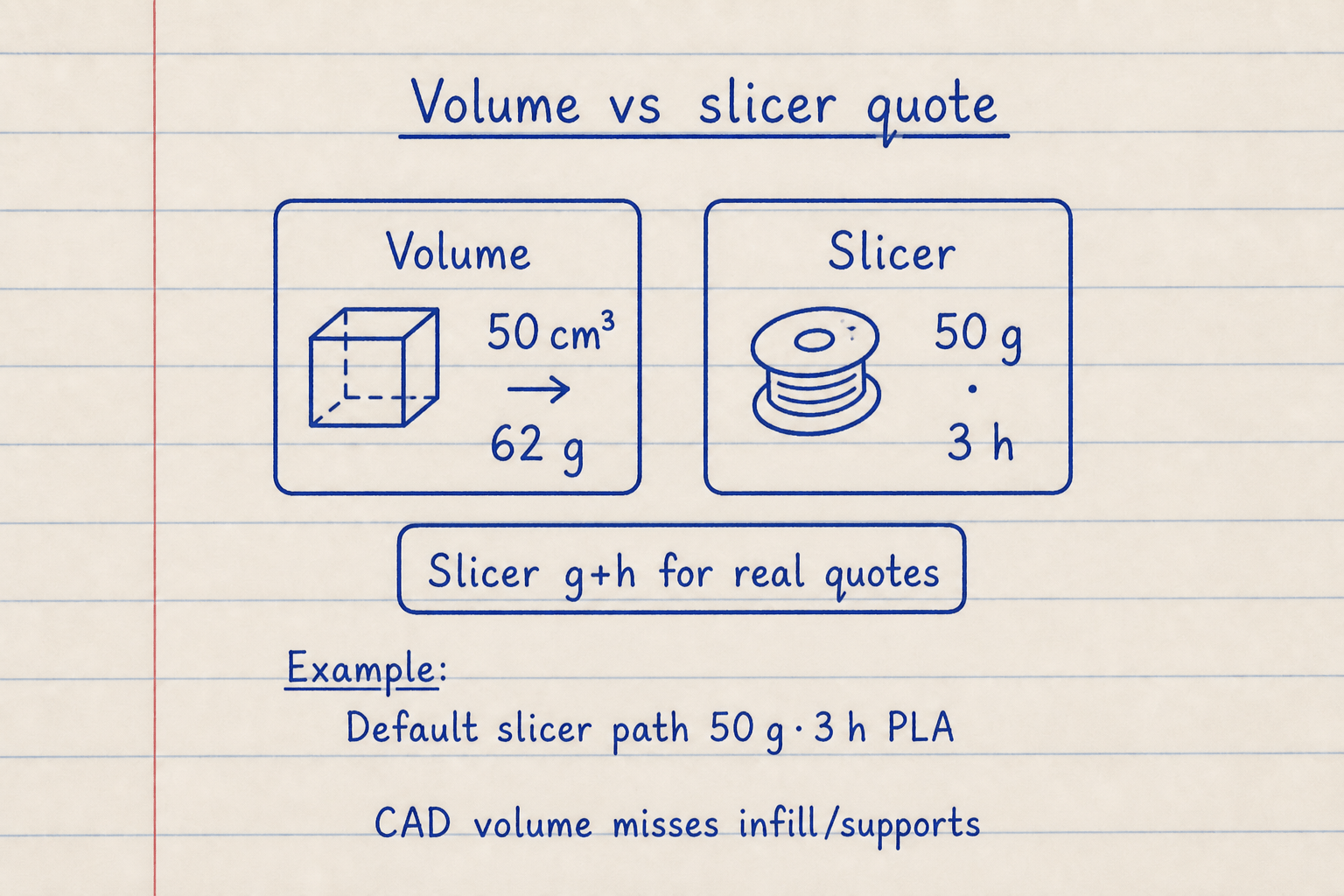
Slicer g + h beat CAD volume for quotes (infill/supports already included). Volume mode is a pre-slice ballpark.
Default slicer path: 50 g · 3 h PLA. Volume 50 cm³ PLA → about 62 g material-only.
Material, electricity, machine, and labor on one pad
A complete FDM quote separates filament cost from power and printer wear. This pad keeps machine hourly and labor hourly as two fields so you can price a farm machine differently from prep and sanding time.
Electricity is (W / 1000) × hours × rate /kWh. For most desktop FDM jobs it is small next to material and labor, but it still belongs on an honest quote. Machine rate can be printer purchase price divided by expected print-life hours, plus a little for nozzles and beds if you want.
Default rates on this pad:
| Field | Default |
|---|---|
| Power | 200 W |
| Electricity | 7 /kWh |
| Machine | 10 /h |
| Labor | 200 /h |
| Prep + post | 10 + 15 min |
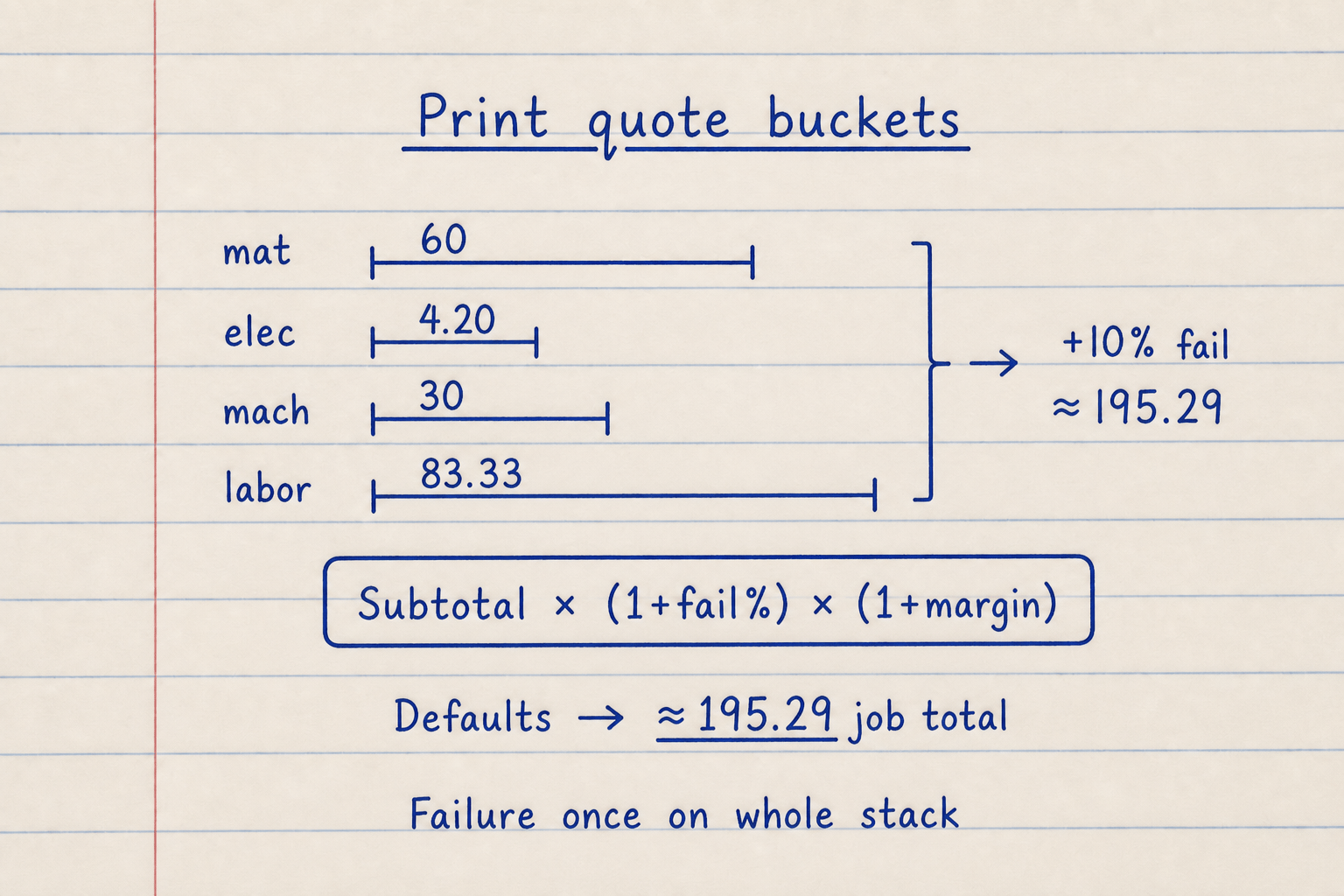
Default buckets: material 60 · electricity 4.20 · machine 30 · labor 83.33 → +10% failure ≈ 195.29.
Failure multiplies the whole subtotal once. Raise quantity to scale print buckets; Other / hardware stays once per job.
Failure buffer and margin without double-counting
Not every print succeeds. A failure buffer multiplies the whole subtotal once so you do not invent a second scrap line on every bucket. Experienced desktop printers often sit near 5–10%. Beginners and new materials need more.
Margin sits on top of the failure-adjusted job total. It is a simple percent for profit or overhead, not a full VAT or tax model. If you sell prints, set margin after you trust the cost stack.
Default path with and without failure:
| Step | Value |
|---|---|
| Subtotal | 177.53 |
| Failure 10% | +17.75 |
| Job total (margin 0) | ≈ 195.29 |
| Same + 40% margin | ≈ 273.40 |
When the volume estimate is good enough
Volume-mode material cost can be built from filament length, density, and diameter. This pad does the same spirit: weight = volume × density, then a rough time from extrusion length, print speed, a 1.07 overhead, and a layer-height factor referenced to 0.2 mm.
That time model is not a slicer. It ignores travel, acceleration, and tool changes. Use it to compare layer heights or diameters, then replace hours with slicer time before you quote a customer. Bake infill and supports into the volume or grams you enter. There is no separate infill % field.
Worked example
Default slicer quote: PLA, 50 g, 3 h, 1200 /kg, 200 W, 7 /kWh, machine 10 /h, prep 10 min, post 15 min, labor 200 /h, failure 10%, margin 0. Reproduce on CALCULATE.
- Leave Input mode on Slicer weight and time. Material PLA. Confirm weight 50 g, print time 3 h 0 min, price 1200 /kg, density 1.24.
- Confirm power 200 W, electricity 7, machine 10 /h, prep 10, post 15, labor 200 /h, failure 10, margin 0, quantity 1.
- CALCULATE. Material = 50/1000 × 1200 = 60.00.
- Electricity = 0.2 × 3 × 7 = 4.20. Machine = 3 × 10 = 30.00. Labor = 25/60 × 200 ≈ 83.33.
- Subtotal = 177.53. With 10% failure ≈ 195.29 job total and cost per part.
Result: Default: about 195.29 per part (and job total at qty 1). Volume estimate at 50 cm³ / 1300 /kg with other rates zero: 62 g and 80.60 material.
When to use
- Quoting an FDM job from slicer weight and time
- Checking whether electricity and machine wear change a cheap filament job
- Adding prep, post-processing, and a failure buffer before you send a price
- Rough material cost from CAD volume before you slice
- Comparing PLA / PETG / ABS / TPU density and price presets
Limitations
- Not a slicer. Volume-mode time is a ballpark (length ÷ speed × 1.07 × layer factor).
- No gcode or STL upload. Paste numbers from your slicer.
- FDM filament focus. No SLA resin, IPA, or FEP consumable library.
- No separate infill or support % fields. Use slicer grams or solid-equivalent volume.
- No VAT or multi-currency conversion. Labels are currency-neutral.
- Other / hardware is one flat job line, not a packaging catalog.
- Not a substitute for a formal print-farm ERP quote.
FAQ
- Why is the default total about 195 instead of just filament cost?
- The default stack includes electricity, machine hourly rate, prep and post labor, and a 10% failure buffer on top of 60.00 material. Filament alone is only one bucket.
- Should I use slicer weight or part volume?
- Use slicer weight and time for quotes. Use volume estimate only when you have not sliced yet and need a rough material check.
- How do I set machine hourly rate?
- A common rule is printer purchase price divided by expected print-life hours (for example 25,000 ÷ 2,500 ≈ 10 /h). Add a little for nozzles and beds if you want.
- Does failure percent apply to material only?
- No. It multiplies the whole subtotal (material + electricity + machine + labor + other) once, then margin applies on top.
- Why does layer height change volume-mode time?
- Thinner layers mean more layers for the same height. Time scales with a 0.2 mm reference: factor = 0.2 / layer height.
- Is electricity worth tracking?
- Often it is small next to filament and labor, but it is real. A 200 W printer for 3 h at 7 /kWh is only 4.20 on the default path.
- Can I quote resin prints here?
- Not as a full resin cost model. This pad is built for FDM filament quotes. Resin washing and FEP wear are out of scope.
- What does quantity change?
- Material, electricity, machine, and labor scale with quantity. Other / hardware is charged once per job, then the full job total is divided by quantity for cost per part.
Machining Cost Calculator
Estimate CNC cost per part and job total from material, cycle time, setup, tooling, finishing, and margin.
Open calculatorMetal Weight Calculator
Bar, plate, tube, washer, and structural weight plus material cost from alloy density, shape dims, quantity, and margin. Metric or Imperial with dual kg/lb.
Open calculator