You need to know whether a bolt or power screw can carry your axial load before you pick a wrench or jack setting. Metric mode looks up ISO coarse As and ISO 898-1 Sp / Re / Rm. Imperial mode adds a Thread series control: ANSI/ASME B1.1 UNC fastener At, or ASME B1.5 ACME root-area screen At ≈ π/4(D − p)², both with SAE J429 Grade 2 / 5 / 8 stresses. Both paths return proof, yield, and ultimate loads, factors of safety, recommended preload (default 75% of proof), and an estimated single-plane shear ≈ 60% of ultimate.
Defaults open on Metric M12 · 8.8 with Fa = 15 kN, 75% proof preload, lightly oiled K = 0.15, target FoS = 2. CALCULATE returns As = 84.3 mm², Fp ≈ 50.6 kN, Fy ≈ 54.0 kN, Fu ≈ 67.4 kN, FoS ≈ 3.37 / 3.60 / 4.50, recommended preload ≈ 37.9 kN, est. shear ≈ 40.5 kN, suggested T ≈ 68.3 N·m, Pass. Switch Imperial for 1/2"-13 UNC · SAE Grade 5, or Thread series ACME for 1/2"-10 ACME, with load in lbf. Math stays in your browser.
It sits under Mechanical Calculators next to the bolt torque calculator and bolt pattern calculator. For ACME raising/lowering torque use the screw jack calculator. This pad answers whether the fastener is adequate. Use the torque pad for wrench settings.
Formula
- Metric: tensile stress area As from ISO coarse tables (M6–M36). Imperial UNC: At from ANSI/ASME B1.1 (1/4"–1"). Imperial ACME: root-area screen At ≈ π/4(D − p)² with p = 1/TPI (1/4"–2").
- Proof load Fp = Sp × As. Yield Fy = Re × As. Ultimate Fu = Rm × As (Sp, Re, Rm in MPa; area in mm² → N).
- FoS_proof = Fp / Fa. FoS_yield = Fy / Fa. FoS_ult = Fu / Fa (∞ when Fa = 0).
- Recommended preload F = η × Fp (default η = 0.75).
- Estimated shear Fs ≈ 0.6 × Fu (common rule of thumb; not a design code).
- Suggested torque T = K × F × d (d in m) is fastener-style (same K presets as the bolt torque pad). For ACME jack raising torque open the screw jack calculator.
Reproduce the default Metric M12 · 8.8 path on CALCULATE:
| Quantity | Value on this pad |
|---|---|
| Size / class | M12 · 8.8 · As = 84.3 mm² |
| Sp / Re / Rm | 600 / 640 / 800 MPa |
| Fp / Fy / Fu | ≈ 50.6 / 54.0 / 67.4 kN |
| Fa / target FoS | 15 kN · 2 |
| FoS (proof / yield / ult.) | ≈ 3.37 / 3.60 / 4.50 · Pass |
| Imperial UNC check | 1/2"-13 UNC · Grade 5 · At = 0.1419 in² · Sp ≈ 85 ksi |
| Imperial ACME check | 1/2"-10 ACME · Grade 5 · At ≈ 0.1257 in² (root-area screen) |
How it works
Metric: ISO coarse As and ISO 898-1 property classes 4.6–12.9. Imperial: ANSI UNC fastener At or ASME B1.5 ACME root-area screen, with SAE J429 Grade 2 / 5 / 8. Returns proof, yield, and ultimate loads, FoS vs axial load, recommended preload (default 75% proof), estimated shear ≈ 0.6×Fu, and a suggested K-factor torque. Deep-links to bolt torque and screw jack calculators.
Pick Metric or Imperial. Metric shows ISO coarse M sizes and property classes 4.6–12.9. Imperial adds a Thread series control: ANSI UNC (fastener At) or ACME (ASME B1.5 power-screw root-area screen), with SAE Grade 2 / 5 / 8 and load in lbf. Enter applied axial load, target FoS vs proof, preload %, and lubrication for suggested torque. CALCULATE locks Results and updates the static 2D capacity joint sketch. Editing clears Results. RESET restores defaults for the active unit system.
As and property class set capacity before you torque
Capacity calculators start from tensile stress area and grade stresses. This pad returns proof, yield, and ultimate loads plus FoS vs your applied tension.
Example: M12 · 8.8 · As = 84.3 mm² · Sp = 600 MPa → Fp = 50,580 N ≈ 50.6 kN. At Fa = 15 kN, FoS_proof ≈ 3.37.
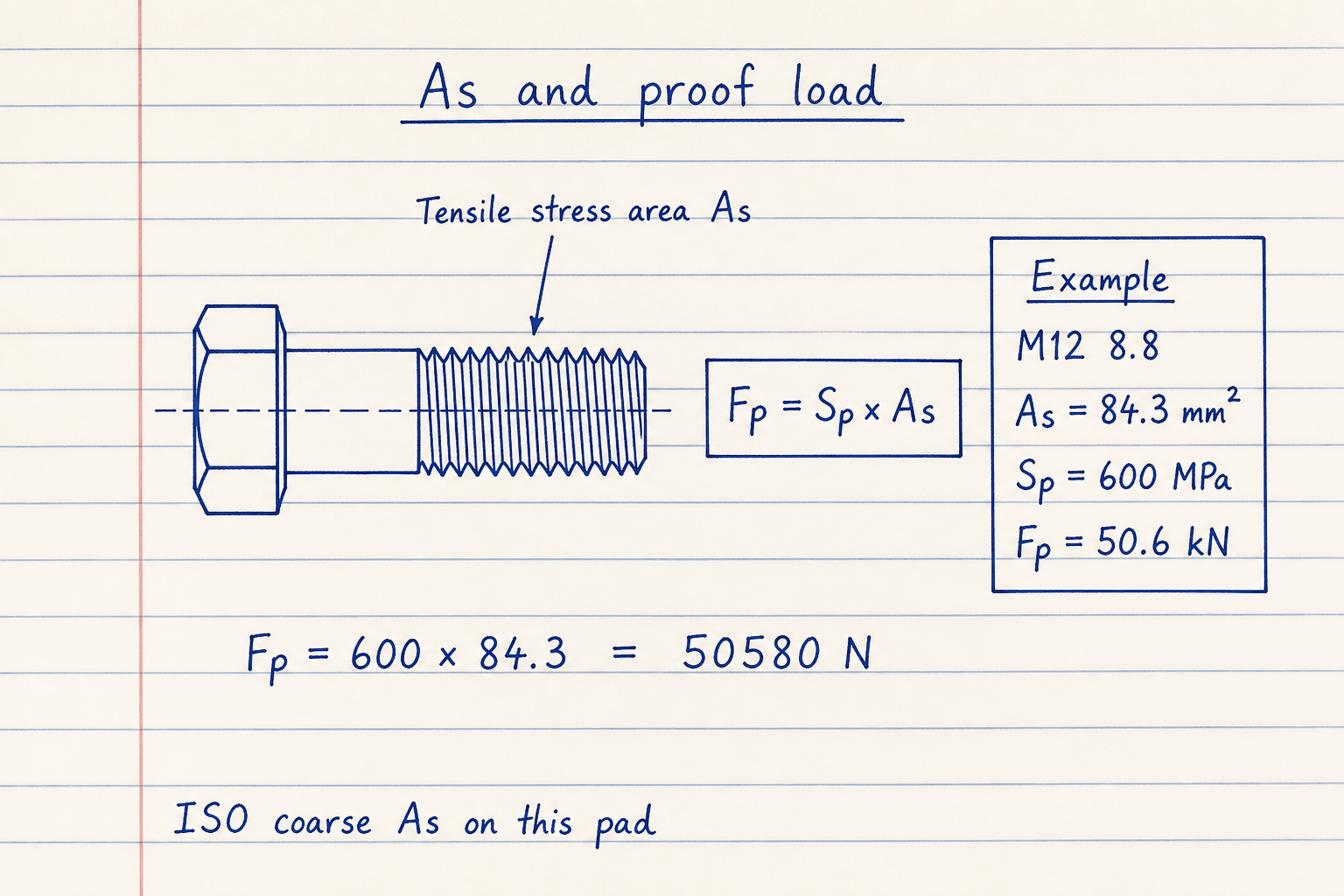
As is the ISO coarse tensile stress area, not the shank area.
8.8 Sp on this pad matches the bolt torque pad (600 MPa shop-chart value).
Applied-load FoS complements torque screening
Torque calculators estimate wrench settings from K and preload. Shop load charts list tensile, yield, proof, and estimated shear. This pad is the capacity screen: Pass when Fp / Fa ≥ your target FoS (default 2).
On the defaults, FoS vs proof / yield / ultimate ≈ 3.37 / 3.60 / 4.50. Zero applied load shows ∞ FoS and No load (not Fail).
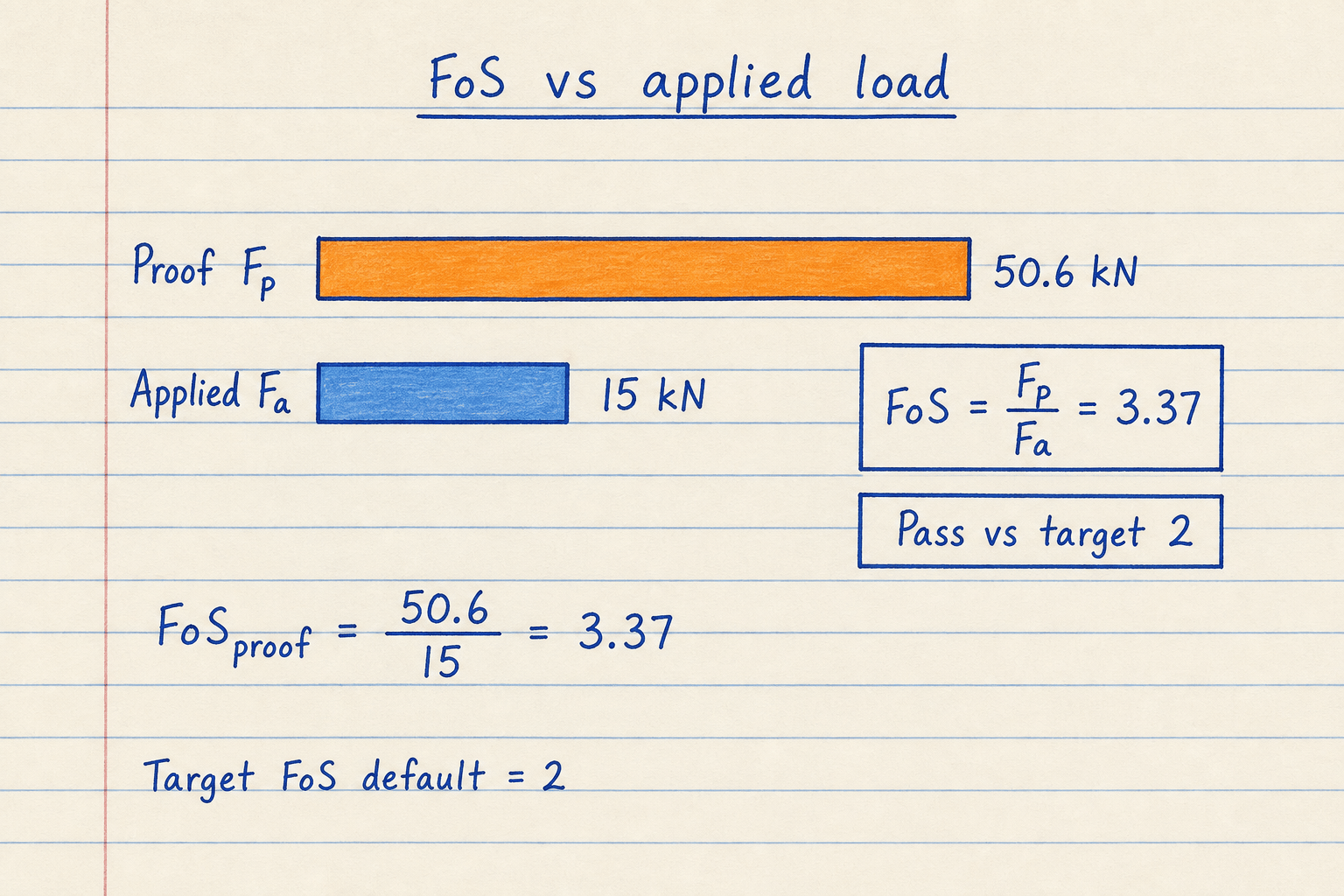
Target FoS is checked against proof, the usual reusable-joint screen.
Pair with the safety factor calculator if you prefer a generic Sy/σ workflow.
Shear estimate and torque hand-off
Shop load charts often quote estimated shear near 60% of tensile strength. Code bolt-group design goes further into AISC/EC3 capacity. This pad keeps a labeled 0.6×Fu estimate only.
Suggested torque uses the same K presets as the bolt torque calculator (default lightly oiled K = 0.15 → ≈ 68.3 N·m at 75% proof on M12 · 8.8). Open that pad for reverse T↔F modes and custom diameter.
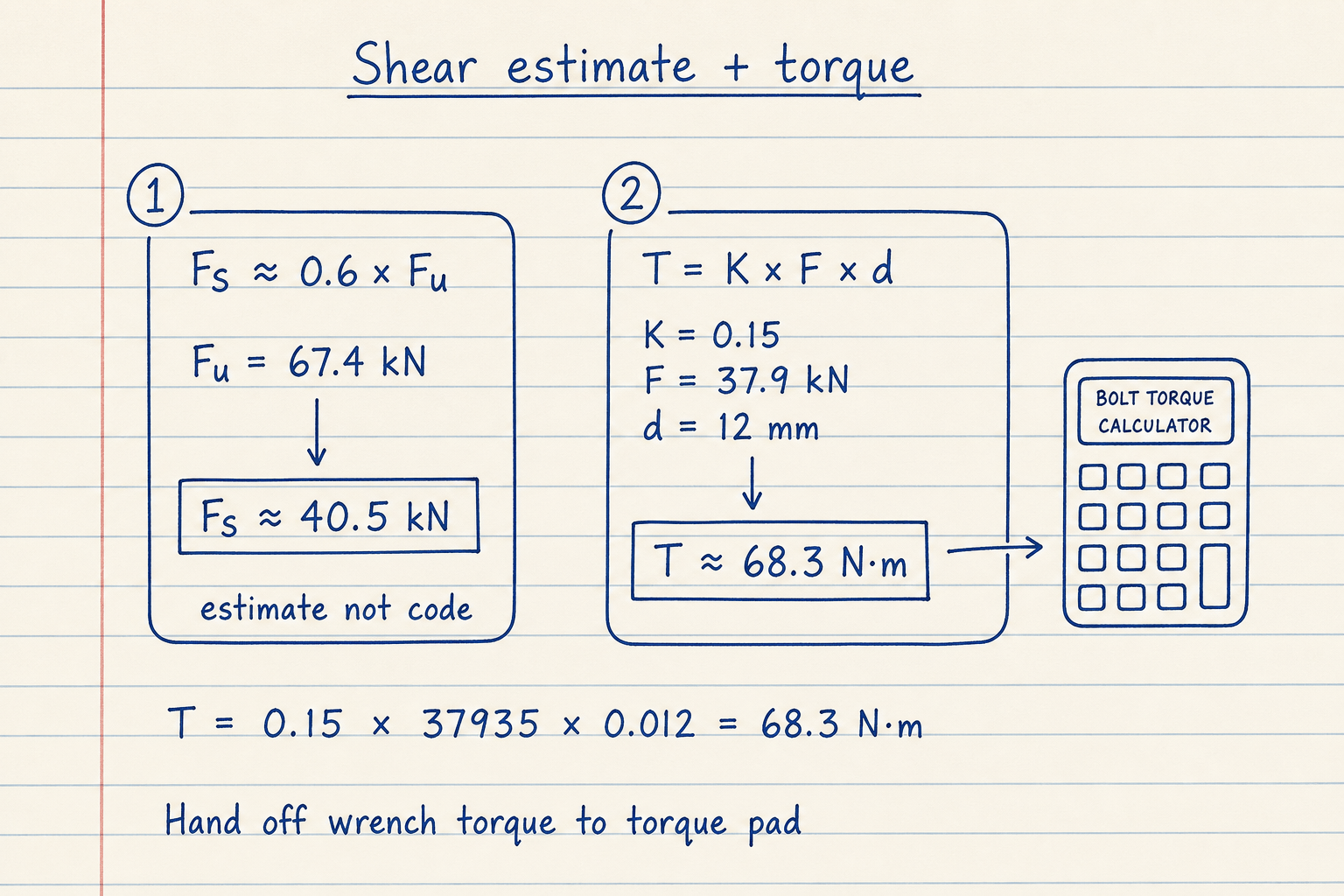
Shear ≈ 0.6 × Fu is a rule of thumb, not AS/AISC/EC3 capacity.
Bolt pattern calculator handles eccentric multi-bolt shear next.
Worked example
Default Metric: M12 · 8.8 · Fa = 15 kN · 75% proof · K = 0.15 · target FoS = 2.
- Leave M12 and 8.8. CALCULATE.
- As = 84.3 mm² → Fp = 50.58 kN, Fy = 53.95 kN, Fu = 67.44 kN.
- FoS = 3.37 / 3.60 / 4.50 → Pass vs target 2.
- Recommended preload = 0.75 × 50.58 ≈ 37.94 kN.
- Est. shear ≈ 0.6 × 67.44 ≈ 40.46 kN. Suggested T ≈ 68.3 N·m.
Result: Pass at FoS_proof ≈ 3.37; size the wrench on the bolt torque pad if needed.
When to use
- Checking if an ISO metric, ANSI UNC, or ACME screw can take an axial tensile load
- Reading proof, yield, and ultimate loads from size and grade
- Setting a 75% proof preload target before opening the torque pad
- Rough single-plane shear estimate (not code capacity)
- Comparing 8.8 vs 10.9 vs 12.9 (Metric) or Grade 5 vs 8 (Imperial)
Limitations
- Metric: ISO coarse As and property classes. Imperial: UNC At or ACME root-area At ≈ π/4(D−p)² with SAE Grade 2 / 5 / 8 (no UNF / stub ACME / multi-start / ASTM A325/A490 tables yet).
- ACME path is an axial root-area screen with SAE stresses — not UNC fastener At and not ACME jack efficiency / self-locking torque.
- Suggested T = K·F·d is fastener-style. Use the screw jack calculator for ACME raising/lowering torque.
- No fine-pitch As. No VDI 2230 detailed friction model.
- Shear is ≈ 0.6×Fu estimate only. Not AISC/EC3 bolt-group design.
- No thread stripping, engagement length, or mating material check.
- Room-temperature static screen. Not fatigue, temperature derating, or hardness.
- Not a substitute for the fastener manufacturer chart on critical joints.
FAQ
- How is this different from the bolt torque calculator?
- Strength answers capacity and FoS vs axial load. Torque answers wrench T from clamp load (or reverse) with K. Use both: capacity here, assembly torque there.
- What changes when I switch Metric / Imperial?
- Metric lists ISO coarse M sizes and property classes 4.6–12.9 with load in kN. Imperial switches to SAE Grade 2 / 5 / 8 with load in lbf, and adds Thread series: ANSI UNC fastener sizes or ACME power-screw sizes. Switching resets size and grade to the defaults for that system.
- When should I pick ACME instead of UNC?
- Use ACME for general-purpose power screws (jacks, vises, lead screws). At is a root-area screen At ≈ π/4(D − p)², not UNC fastener tensile stress area. Suggested T on this pad stays fastener-style K·F·d; for raising/lowering torque and self-locking, open the screw jack calculator.
- Why is 8.8 proof 600 MPa, not 640?
- ISO 898-1 has size-band nuances for 8.8 Sp. This site uses 600 MPa on both the strength and torque pads so proof and % of proof stay consistent with common shop charts.
- Is estimated shear safe for design?
- No. It matches the common 60% of ultimate tensile load rule as a quick screen. Structural connections need AISC/EC3/AS capacity including threads in/out of the shear plane.
- What FoS should I target?
- The pad defaults to 2 vs proof for a simple Pass/Fail. Machine design often uses higher margins under shock or uncertainty. Follow your drawing or standard.
- Does this cover eccentric bolt groups?
- No. Use the bolt pattern calculator for in-plane eccentric shear, then check the critical bolt force against capacity here.
Bolt Torque Calculator
Tightening torque from diameter, target preload, and lubrication K. Metric ISO or inch UNC, reverse clamp load, and % of proof.
Open calculatorScrew Jack Calculator
Raising and lowering torque, handle effort, efficiency, collar drag, and self-locking for screw jacks.
Open calculatorBolt Pattern / Group Calculator
Elastic bolt-group shear: rectangular, circular, or custom pattern under Vx, Vy, eccentricity, and Mz.
Open calculatorSafety Factor Calculator
Factor of safety from strength ÷ stress. Yield or ultimate basis, material presets, and reverse solve modes.
Open calculatorKey & Keyway Design Calculator
ANSI B17.1 / ISO 773 key lookup plus parallel-key shear and bearing stress check under torque.
Open calculator