You need spindle RPM and table feed from a catalog cutting speed, or the reverse: the true surface speed on a dialed RPM. This pad does both in Metric (Vc m/min, D mm, fz mm/tooth) and Imperial (SFM, inches, IPT / IPM). Material starting chips fill a first-pass Vc and chip load; optional cut length returns cut time.
Defaults open on Metric · RPM & feed from cutting speed · Mild steel carbide start: 120 m/min, 25 mm tool, 0.10 mm/tooth, 4 flutes. CALCULATE returns 1,528 RPM, 611.2 mm/min feed, and actual Vc ≈ 120.0 m/min. Switch Imperial for the common SFM × 3.82 / D path, or reverse mode to solve Vc from RPM. Math stays in your browser.
It sits under Machining Calculators next to the milling calculator, drilling calculator, and lathe calculator. This pad is the general Vc ↔ RPM hub — not MRR or tool-catalog G-code.
Formula
- Metric RPM: n = (Vc × 1000) / (π × D). Vc in m/min, D in mm. Round n to an integer machine dial.
- Imperial RPM: n = (SFM × 12) / (π × D) ≈ SFM × 3.82 / D (common shop constant).
- Table feed: Vf = fz × Z × n (mm/min or IPM). Feed per rev = fz × Z.
- Actual cutting speed after rounding: Vc = (π × D × n) / 1000 (metric) or SFM = (π × D × n) / 12 (imperial).
- Reverse mode: enter dialed RPM and diameter to solve actual Vc / SFM.
- Optional cut time: t = L / Vf when cut length L is entered.
Reproduce the default Metric mild-steel path on CALCULATE:
| Quantity | Value |
|---|---|
| Inputs | Vc 120 m/min · D 25 mm · fz 0.10 · Z 4 |
| RPM | 1,528 (rounded) |
| Table feed Vf | 611.2 mm/min |
| Actual Vc | ≈ 120.0 m/min |
| Imperial twin | 400 SFM · 1 in · 0.004 IPT · Z 4 → same 1,528 RPM |
How it works
Metric: RPM = Vc × 1000 / (π × D). Imperial: RPM = SFM × 12 / (π × D). Table feed = chip load × teeth × RPM. Reverse mode solves actual cutting speed from a dialed spindle RPM.
Pick Metric or Imperial (tab switch resets defaults). Choose Input mode: RPM & feed from cutting speed (default) or Cutting speed from RPM — each mode swaps a different live SVG (Vc→RPM flow vs spindle-dial→actual Vc). Mode 0 shows material preset chips that fill Vc/SFM and a starting chip load — edit Vc or fz to jump to Custom. Enter tool diameter, teeth, and optional cut length. CALCULATE fills Results and drives the diagram numbers (Play/Pause). Editing a field clears Results. RESET restores the active tab’s mild-steel defaults.
Vc to RPM — metric and the 3.82 imperial shortcut
Cutting-speed and RPM calculators all use the same circumference idea: surface speed divided by πD. Metric uses Vc × 1000 / (π × D). Imperial uses SFM × 12 / (π × D), often written as SFM × 3.82 / D.
This pad keeps both unit systems. Integer RPM matches what you can dial on a CNC or manual machine; Actual Vc / SFM is recomputed from that rounded RPM so you see the true surface speed.
Same physics, two unit systems:
| System | RPM formula | Feed formula |
|---|---|---|
| Metric | n = Vc×1000/(π×D) | Vf = fz×Z×n (mm/min) |
| Imperial | n = SFM×12/(π×D) ≈ 3.82×SFM/D | IPM = IPT×Z×n |
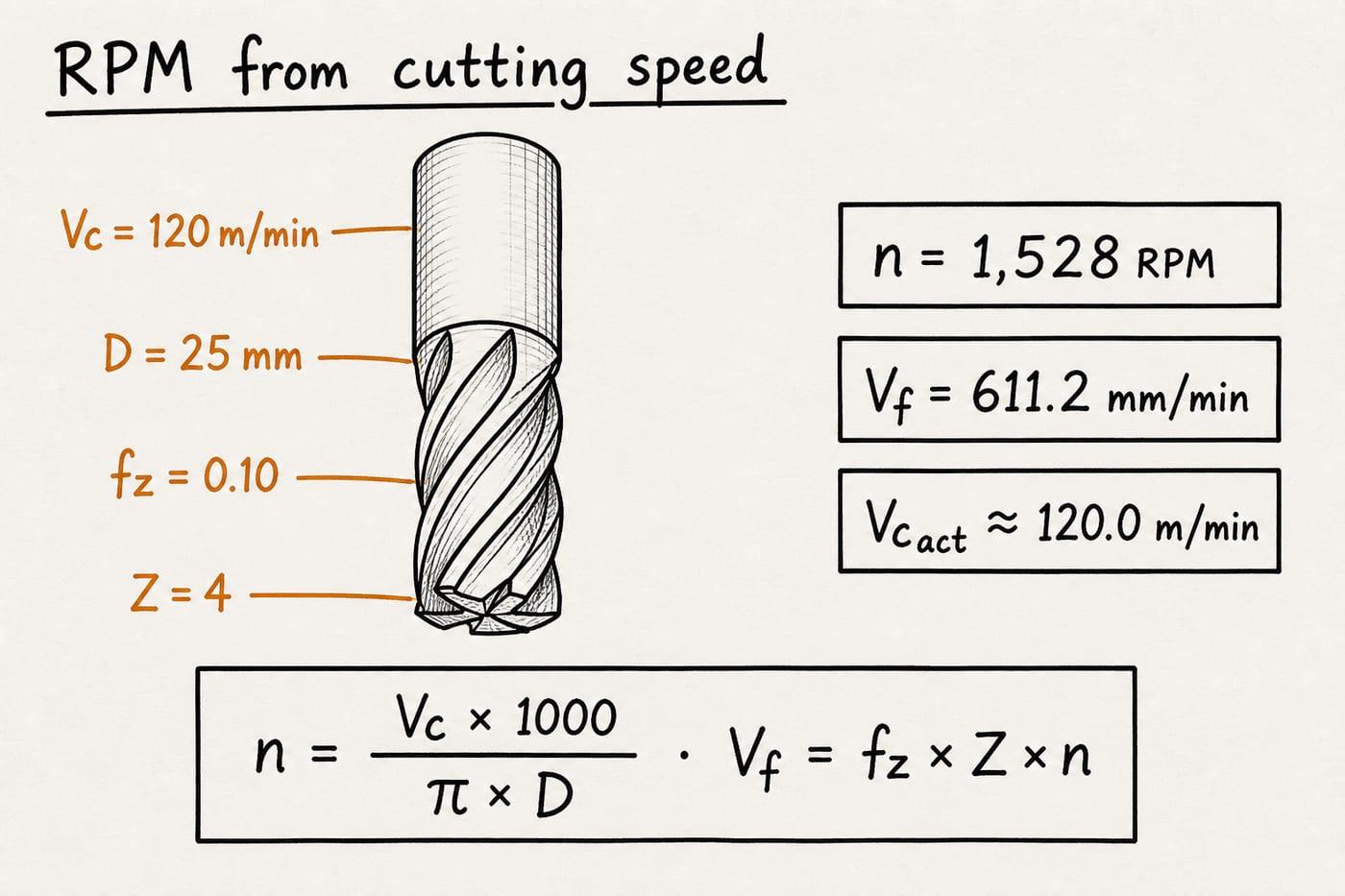
Default CALCULATE path: 120 × 1000 / (π × 25) → 1,528 RPM; Vf = 0.10 × 4 × 1,528 = 611.2 mm/min.
Imperial cross-check on the same spindle idea: 400 SFM on a 1 in tool also lands on 1,528 RPM.
Reverse solve: cutting speed from dialed RPM
When RPM is already dialed and you want the true surface speed, flip the problem: given tool or blade diameter and RPM, what is Vc or SFM? Choose Cutting speed from RPM to check a program against a catalog limit or a saw-blade rating.
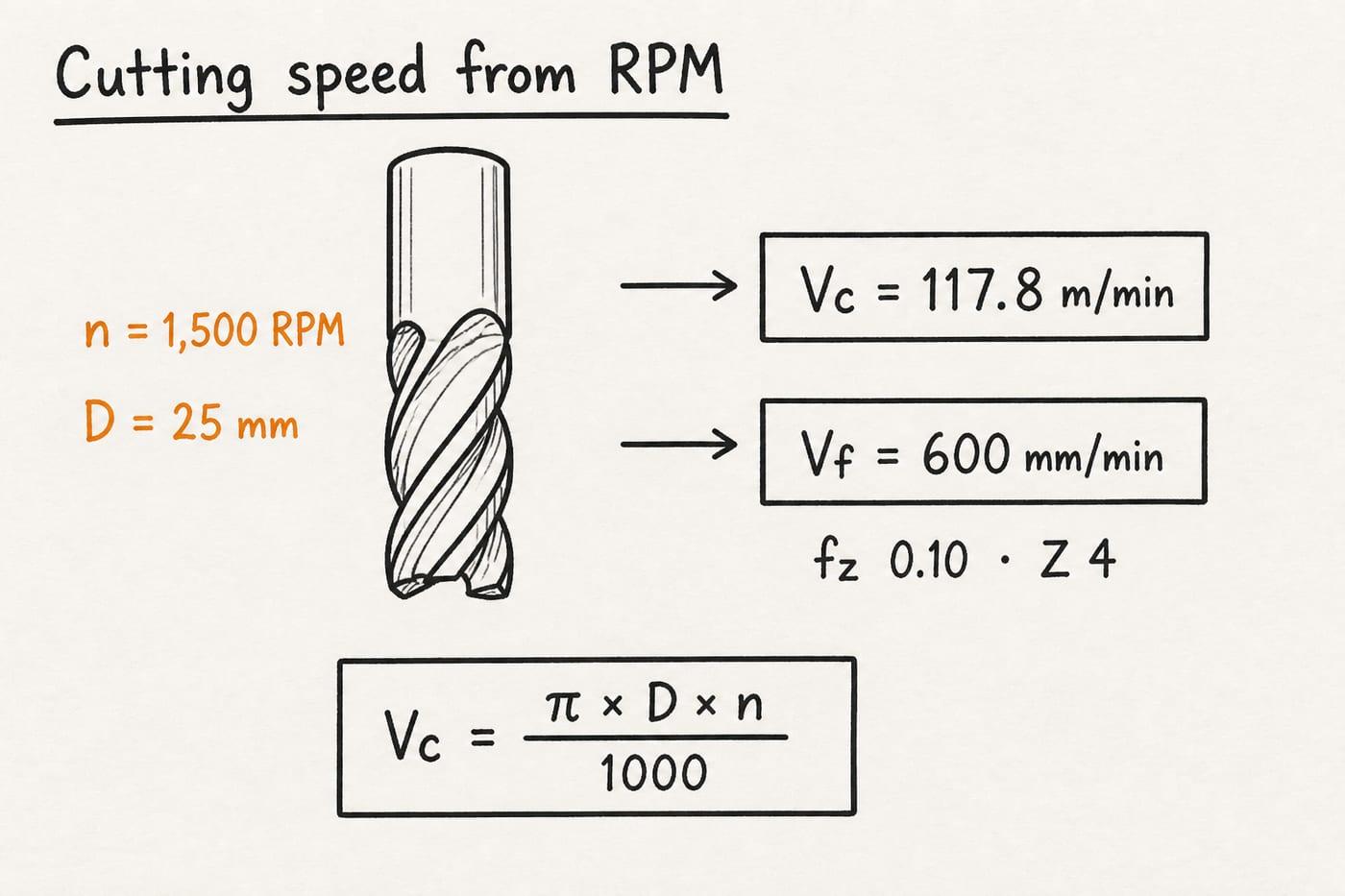
Reverse mode example: 1,500 RPM · 25 mm → Vc ≈ 117.8 m/min; with fz 0.10 and Z 4, feed = 600 mm/min.
Same reverse idea works in Imperial: SFM = π × D(in) × RPM / 12.
Chip load, table feed, and optional cut time
Table feed multiplies RPM × teeth × feed per tooth for IPM, then divides cut length by feed for cut time. The same Feed = RPM × chip load × teeth rule applies in both metric and imperial workflows.
On this pad, table feed always uses fz × Z × RPM. Enter an optional cut length to get cut time in minutes (and seconds in the card note). Depth of cut, stepover, and MRR stay on dedicated milling tools — out of scope here.
Feed building blocks:
| Symbol | Meaning |
|---|---|
| fz / IPT | Chip load per tooth |
| Z | Teeth or flutes in cut |
| n | Spindle RPM (integer) |
| Vf / IPM | Table feed = fz × Z × n |
| t | Cut time = L / Vf (optional L) |
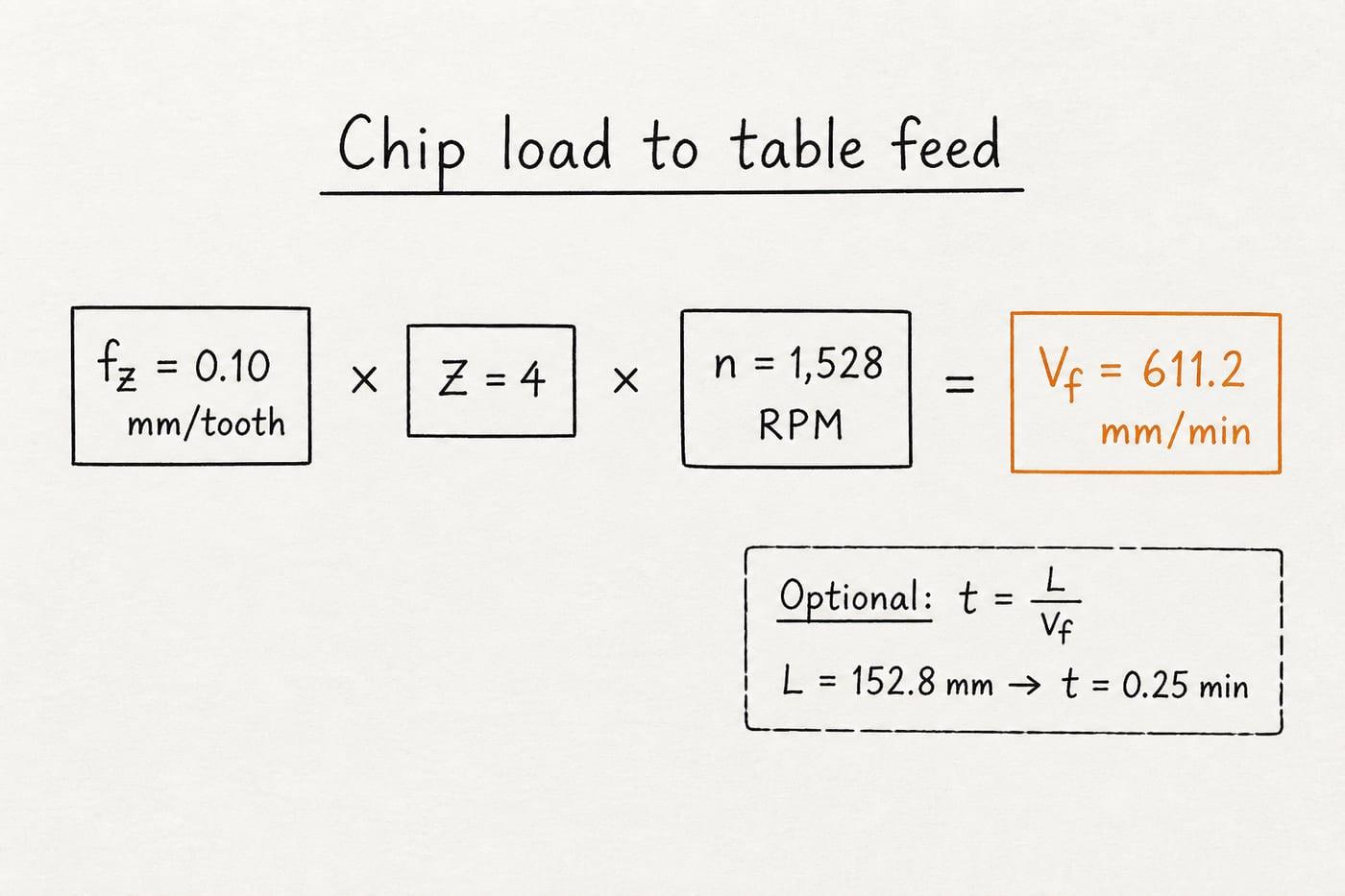
Feed per rev = fz × Z. Table feed multiplies that by RPM.
Example: 152.8 mm cut length at 611.2 mm/min → 0.25 min (15 s).
Material starting chips — not a full tool catalog
Material presets update RPM from diameter against a table of surface speeds by material. This pad follows that idea with carbide-style starting Vc/SFM and a matching chip-load hint.
Treat them as screening values only. Coatings, coolant, rigidity, and the specific insert or end mill change the safe answer. Always confirm with your tool vendor data before a production cut.
Preset starting points on this pad (carbide-style screening):
| Material | Vc (m/min) | SFM | fz (mm) | IPT |
|---|---|---|---|---|
| Mild steel | 120 | 400 | 0.10 | 0.004 |
| Aluminum | 300 | 1000 | 0.15 | 0.006 |
| Stainless | 80 | 260 | 0.06 | 0.0025 |
| Cast iron | 100 | 330 | 0.10 | 0.004 |
| Brass / bronze | 150 | 500 | 0.12 | 0.005 |
| Titanium | 50 | 160 | 0.05 | 0.002 |
Worked example
Default Metric · RPM & feed from cutting speed · Mild steel: 120 m/min, 25 mm, 0.10 mm/tooth, 4 flutes. Reproduce on CALCULATE.
- Leave Metric and mode RPM & feed from cutting speed. Material Mild steel (carbide start).
- CALCULATE → n = 1,528 RPM; Vf = 611.2 mm/min; actual Vc ≈ 120.0 m/min.
- Imperial cross-check: Imperial tab, 400 SFM, 1 in, 0.004 IPT, Z 4 → same 1,528 RPM, 24.45 IPM.
- Reverse mode: Cutting speed from RPM, 1,500 RPM, 25 mm → Vc ≈ 117.8 m/min.
- Cut-time example: same default plus cut length 152.8 mm → t = 0.25 min.
Result: Default: 1,528 RPM · 611.2 mm/min · Vc ≈ 120 m/min. Reverse at 1,500 RPM: Vc ≈ 117.8 m/min.
When to use
- Converting catalog Vc or SFM to spindle RPM
- Computing table feed from chip load and flute count
- Checking actual surface speed from a dialed RPM
- Quick Metric ↔ Imperial speeds-and-feeds screening
- Estimating cut time from length and feed
Limitations
- Does not check machine power, rigidity, tool holder, or coolant limits.
- Material chips are starting points — not grade-specific vendor data.
- No radial/axial chip thinning or HSM engagement factors.
- Not an MRR calculator (ae × ap × Vf stays separate).
- Rounded RPM slightly changes actual cutting speed by design.
- Drilling feed-per-rev and lathe facing CSS belong on their dedicated pads.
FAQ
- What is cutting speed Vc / SFM?
- The linear speed of the cutting edge through the work surface. Metric uses m/min (Vc); Imperial uses surface feet per minute (SFM). Catalogs list starting values by material and tool.
- Why round RPM?
- CNC machines and manual dials use integer RPM. Rounding matches what you can actually set; Actual Vc/SFM shows the true surface speed after that round.
- How is feed rate different from feed per tooth?
- Feed per tooth (fz or IPT) is chip load per cutting edge. Table feed = fz × number of teeth × RPM.
- When do I use reverse mode?
- When RPM is already dialed (or limited by the machine) and you want the resulting Vc or SFM on that diameter.
- Metric or Imperial?
- Use Metric for mm and m/min shops. Use Imperial for SFM / inch / IPM workflows. Switching tabs resets defaults so units never mix quietly.
- Is this the same as the milling calculator?
- Same Vc–RPM–feed core. This pad adds Metric/Imperial, reverse Vc-from-RPM, material chips, and optional cut time. Use the milling or drilling pads for operation-specific labels and defaults.
Milling RPM and Feed Calculator
Milling spindle RPM and table feed from cutting speed, tool diameter, and chip load.
Open calculatorDrilling RPM and Feed Calculator
Drill RPM and feed rate from diameter, cutting speed, and feed per revolution.
Open calculatorLathe RPM and Cutting Speed Calculator
Spindle RPM and achieved peripheral speed from work diameter and cutting speed.
Open calculatorMachining Time Estimator
Turning, milling, and drilling cycle time from length, feed, and RPM.
Open calculator