Before you PO bar, plate, tube, or a structural cut, you need a trustworthy mass and a first-pass material cost. This pad takes alloy density, section shape, and shop dims, then returns volume, weight in both kg and lb, and price from your rate, quantity, and margin.
Pick Metric or Imperial, choose a material family and grade (or type a custom density), set Dimension unit, pick one of fourteen shapes, enter only the fields that shape needs, then CALCULATE. Metric opens on a 50 × 25 × 1000 mm mild-steel flat bar at 7.85 g/cm³. Imperial opens on 2 × 1 × 36 in at 0.284 lb/in³. Switching tabs resets defaults so inch and millimetre values never mix quietly. Math stays in your browser.
It sits with weld, punch, and print tools under Manufacturing Calculators. After plate mass looks right, check formability on the minimum bend radius calculator. For a one-off length or density conversion outside this pad, use the unit converter.
Formula
- Metric weight (kg) = volume (mm³) × density (g/cm³) / 1,000,000. Imperial uses the same mass path and shows lb as the primary weight. Both kg and lb always appear in Results.
- Solid bar and plate: square V = side² × L; rect / plate V = thickness × width × L; round V = π × (D/2)² × L; hex AF V = (√3 / 2) × AF² × L; octagon AF V = 2(√2 − 1) × AF² × L.
- Round tube (OD): ID = OD − 2 × wall, then V = (π/4) × (OD² − ID²) × L. Round tube (ID): OD = ID + 2 × wall, same annulus.
- Rect / square tube: outer area minus inner hollow (sharp corners). Ring / washer: V = (π/4) × (OD² − ID²) × thickness.
- Angle: V = (leg1 + leg2 − t) × t × L. Channel: V = (H × t + 2 × (Bf − t) × t) × L with H as overall height. I-beam: V = (2 × Bf × tf + max(0, H − 2 × tf) × tw) × L.
- Unit price = unit weight × price per kg (Metric) or per lb (Imperial). Total price = unit price × quantity × (1 + margin/100).
Reproduce these defaults on the live pad:
| Path | Inputs | CALCULATE result |
|---|---|---|
| Metric flat bar | 50 × 25 × 1000 mm, 7.85 g/cm³ | 1,250,000 mm³, 9.8125 kg (21.63 lb) |
| Imperial flat bar | 2 × 1 × 36 in, 0.284 lb/in³ | 72 in³, 20.448 lb (9.28 kg) |
| Metric price line | 9.8125 kg × 85 /kg, qty 1, margin 0 | Unit / total price 834.06 |
| Metric + 10% margin | Same bar, margin 10 | Total price ~917.47 |
How it works
Pick Metric or Imperial, choose a material family and grade to fill density (or type a custom density), set Dimension unit, then pick the section shape. Fields adapt to the shape. Weight equals volume times density; results show kg and lb. Unit and total price use your currency, per-mass rate, quantity, and margin. Switching tabs resets to that system’s defaults.
Choose Metric or Imperial. Select Material Family and Grade to fill density (or choose Custom and type it). Set Dimension unit (mm, cm, in, ft, and so on). Pick Section Shape so only the needed fields show. Enter dims, currency, price per kg or per lb, quantity, and optional margin. Click CALCULATE. Editing a field or changing currency clears Results. RESET restores that tab’s defaults.
Metric, Imperial, and dimension units
The Metric tab works in millimetres for shape dims (unless you change Dimension unit), density in g/cm³, and primary weight in kg. Imperial uses inches by default, density in lb/in³, and primary weight in lb. Volume and area labels follow the active Dimension unit (mm³, cm³, in³, ft³, and so on). Unit Weight and Total Weight always show both kg and lb.
Dimension unit converts the typed dims when you change it (µm, mm, cm, m on Metric; mil, in, ft, yd on Imperial). Switching Metric ↔ Imperial does not convert in place. It resets to that tab’s sample stock so a half-finished millimetre bar cannot become a wrong inch PO.
What each tab expects:
| Control | Metric default | Imperial default |
|---|---|---|
| Dimension unit | mm (also µm, cm, m) | in (also mil, ft, yd) |
| Density | g/cm³ | lb/in³ |
| Price field | Price Per kg | Price Per lb |
| Primary weight | kg | lb |
| Sample bar | 50 × 25 × 1000 mm | 2 × 1 × 36 in |
Alloy density presets for shop grades
Pick a family (carbon steel, stainless, aluminum, copper alloys, nickel, titanium, and more), then a grade. The pad fills density in the active tab’s unit from a shop catalog of 100+ alloys. Density stays editable after the preset. Choose Custom when your mill certificate differs from the catalog average.
Nominal metal densities are summarized in many engineering handbooks. Mild steel defaults to 7.85 g/cm³ or the common shop value 0.284 lb/in³. For critical freight or aerospace work, prefer the mill cert over any preset.
Example preset densities on this pad:
| Material | g/cm³ | lb/in³ |
|---|---|---|
| Mild / carbon steel | 7.85 | 0.284 |
| Stainless 304 / 316 | 8.0 | 0.289 |
| Aluminium 6061 | 2.70 | 0.0975 |
| Brass C36000 | 8.5 | 0.3071 |
| Copper C11000 | 8.94 | 0.323 |
| Titanium Grade 5 | 4.43 | 0.160 |
Which dims each section shape asks for
Only the dimensions that shape needs appear. Round bar shows Diameter and Length. Hex and octagon use Across flats (flat-to-flat), the usual bar callout. Round tube offers OD+wall or ID+wall. Rectangular tube asks for Height, Width, and Wall. Ring / washer uses OD, ID, and Thickness (axial height, not bar length).
The live SVG next to the fields uses the same short labels (T, W, L, OD, AF) so you can match the sketch to the form. Solid bars also report Cross Section area in Results.
Field map for common stock:
| Shape | Fields you enter |
|---|---|
| Square bar | Side (A), Length (L) |
| Rect / flat / plate | Thickness (T), Width (W), Length (L) |
| Round bar | Diameter (D), Length (L) |
| Hex / octagon | Across flats (AF), Length (L) |
| Round tube (OD / ID) | OD or ID, Wall (t), Length (L) |
| Rect / square tube | Outer sizes, Wall (t), Length (L) |
| Ring / washer | OD, ID, Thickness (T) |
| Angle / channel / I-beam | Overall legs or H, Bf, thicknesses, Length |
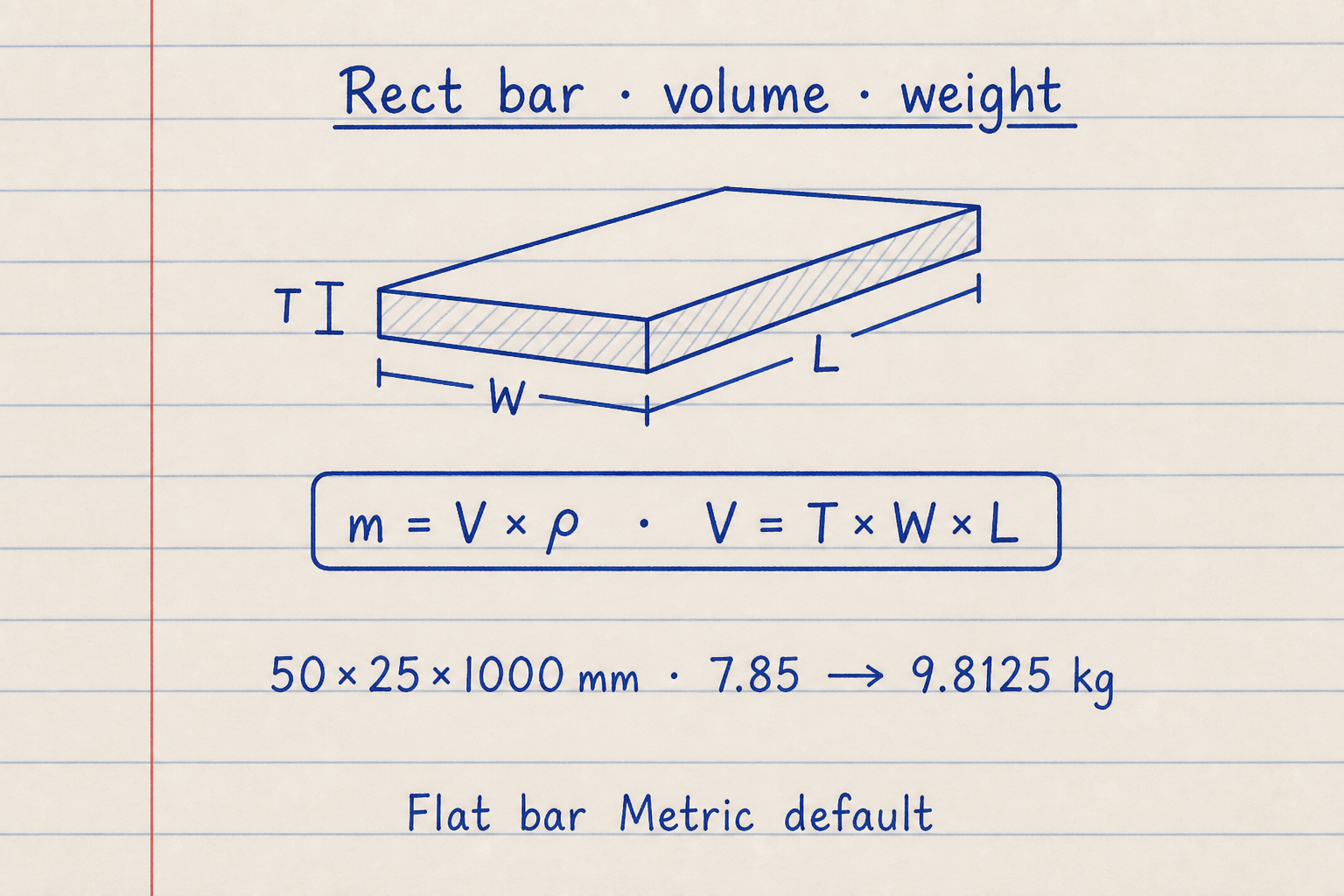
Metric default flat bar: T×W×L = 50 × 25 × 1000 = 1,250,000 mm³ → mass = 9.8125 kg at 7.85 g/cm³.
Reproduce those numbers on CALCULATE before you change shapes or price fields.
Tubes, pipes, and washers without counting the air
Hollow stock is never a solid bar with the same outside size. Round tube (OD) sets ID = OD − 2 × wall, then uses the annulus volume. If wall is half the OD or more, CALCULATE fails with a wall-too-large error. Round tube (ID) sets OD = ID + 2 × wall and does not reject on wall size, because the outside grows with the wall.
Rectangular and square tube subtract the inner hollow with sharp corners (no outer corner radius). Ring / washer volume is (π/4) × (OD² − ID²) × thickness. Enter thickness as the axial height of the washer.
Hollow geometry checks this pad enforces:
| Shape | Rule that fails CALCULATE |
|---|---|
| Round tube (OD) | Wall ≥ OD / 2 |
| Round tube (ID) | No wall-size reject (OD = ID + 2 × wall) |
| Square tube | Wall ≥ side / 2 |
| Rect tube | Wall ≥ height / 2 or width / 2 |
| Ring / washer | ID ≥ OD |
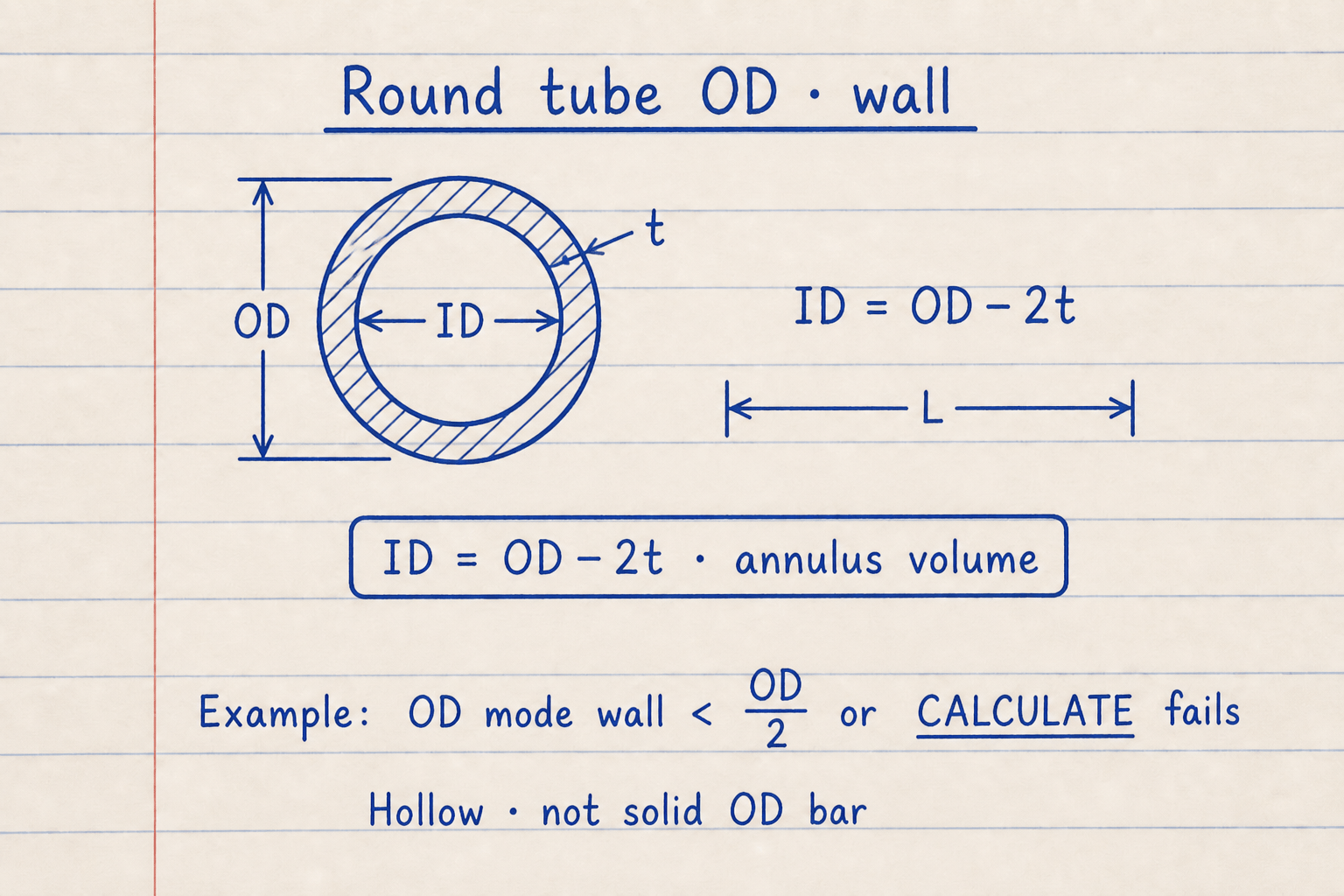
OD mode: measure outside diameter and wall → ID = OD − 2t. ID mode: measure bore and wall when the drawing calls that out.
Hollow annulus only — not a solid bar of the same OD. OD mode fails CALCULATE if wall ≥ OD/2.
Angle, channel, and I-beam as sharp-corner volumes
Angle, channel, and I-beam on this pad use simplified sharp-corner geometry. That is fast for first-pass mass, but it is not a full mill catalog section with fillets and toe radii. For published kg/m or lb/ft from AISC or EN tables, prefer the mill weight when the PO is critical.
Channel Height (H) is overall outside depth, not clear web depth between flanges. I-beam uses overall Height, Flange width (Bf), Web thickness (tw), and Flange thickness (tf). Angle corrects the corner once so the overlapping square is not counted twice.
Structural volume shortcuts on this pad:
| Shape | Cross-section used |
|---|---|
| Angle | (L1 + L2 − t) × t |
| Channel | H × t + 2 × (Bf − t) × t |
| I-beam | 2 × Bf × tf + (H − 2 × tf) × tw |
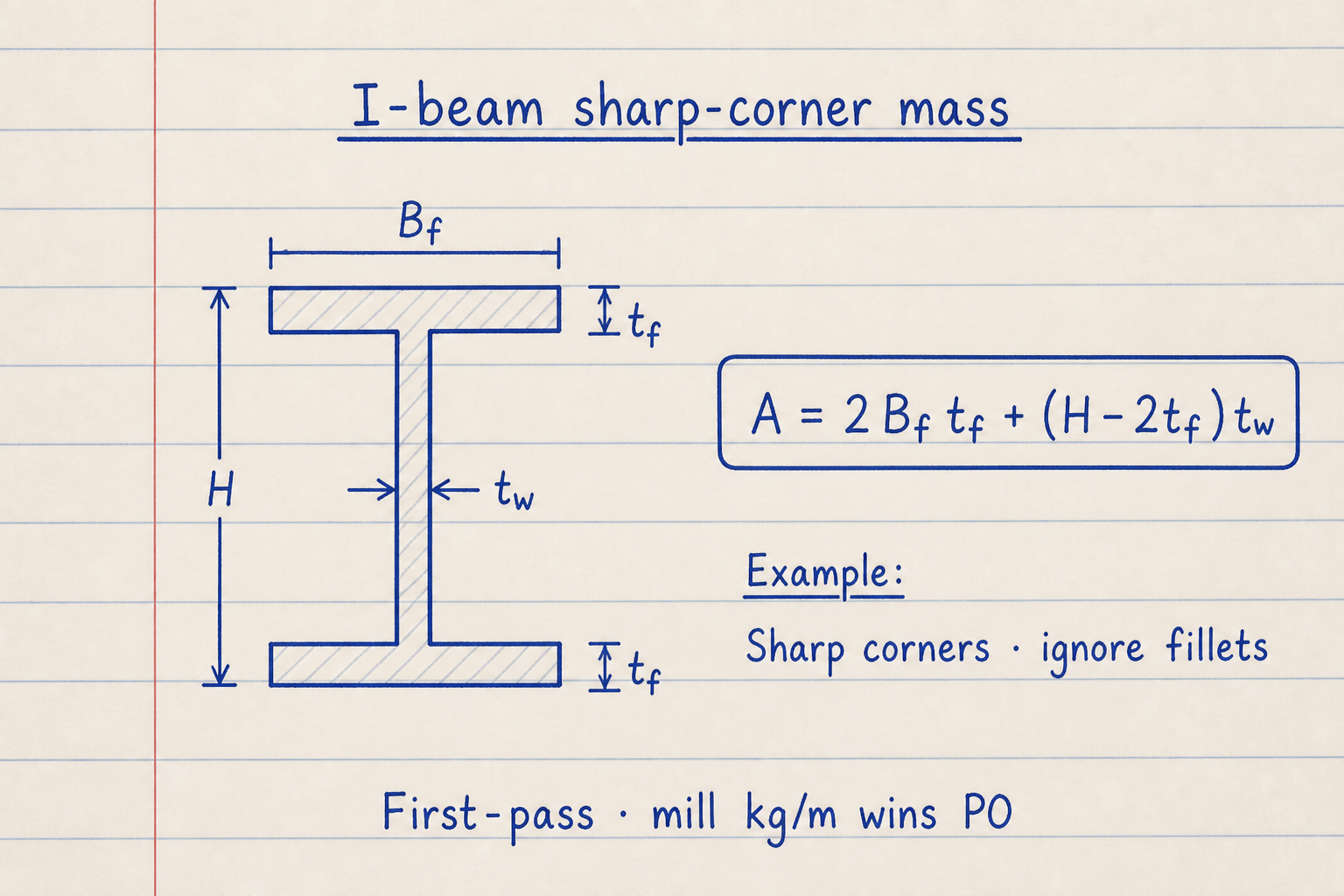
A = 2×Bf×tf + (H − 2×tf)×tw. Sharp corners only — mill kg/m still wins a critical PO.
If CALCULATE rejects dims, check 2×tf < H and tw ≤ Bf.
Price, quantity, margin, and currency
Unit Price is stock mass times your price field. On Metric that field is Price Per kg. On Imperial it is Price Per lb. Total Price multiplies by Quantity, then applies Margin as a percent: Total Price = Unit Price × qty × (1 + margin/100). Margin 0 leaves a raw material line. Margin 10 on the Metric default bar at 85 per kg raises total from 834.06 to about 917.47.
Currency is a display label (INR, USD, EUR, and others). The pad does not convert currencies or pull live metal indices. Changing currency clears Results so a rupee total is not silently relabeled as dollars. Confirm the final line against your supplier quote.
How price fields feed Results:
| Result card | What it uses |
|---|---|
| Unit Price | Unit weight × price per kg or per lb |
| Total Price | Unit Price × quantity × (1 + margin/100) |
| Margin 0% | Total equals unit price × quantity |
| Currency | Symbol only; no FX conversion |
Worked example
Metric tab, Carbon / Mild Steel → Mild / Carbon Steel, rectangular / flat bar, Dimension unit mm, Thickness 50, Width 25, Length 1000, quantity 1, price 85 per kg, margin 0%, currency INR.
- Keep Metric selected. Confirm density filled to 7.85 g/cm³ from the mild-steel grade.
- Set Section Shape to Rectangular / flat bar and Dimension unit to mm.
- Volume = 50 × 25 × 1000 = 1,250,000 mm³. Cross section = 1,250 mm².
- Unit weight = 1,250,000 × 7.85 / 1,000,000 = 9.8125 kg (about 21.63 lb).
- Unit price = 9.8125 × 85 = 834.06 (same as Total Price at qty 1 and margin 0).
Result: Volume 1,250,000 mm³, cross section 1,250.00 mm², unit weight 9.8125 kg / 21.63 lb, unit and total price ₹834.06 on CALCULATE.
When to use
- Quoting raw bar, plate, tube, washer, or cut length weight before a purchase order
- Checking shipping mass for stock lengths and cut counts in millimetres or inches
- Building a first-pass material cost line with currency, price per mass, quantity, and margin
- Comparing aluminium vs steel mass for the same envelope using grade presets
- Sanity-checking a supplier kg/m or lb/ft claim against dims on the drawing
Limitations
- Switching Metric ↔ Imperial resets inputs. Values are not auto-converted across tabs.
- No kerf, saw scrap, grip length, or remnant allowance. Add cut loss yourself before ordering.
- Angle, channel, and I-beam use sharp-corner geometry, not full mill catalog fillets.
- Density presets are typical averages. Alloys and finishes can shift real mass a few percent.
- Currency is a symbol only. The pad does not convert FX or pull live metal indices.
- Not a substitute for mill weight tables or certified weighbridge tickets on critical freight.
FAQ
- What happens when I switch Metric and Imperial?
- The form resets to that tab’s defaults and clears Results. Metric restores a 50 × 25 × 1000 mm mild-steel bar at 7.85 g/cm³. Imperial restores 2 × 1 × 36 in at 0.284 lb/in³. Numbers are not converted in place, so you cannot silently mix millimetre dims with an inch length.
- What does Dimension unit change?
- Dimension unit scales every shape field (thickness, OD, length, and so on) into µm, mm, cm, m or mil, in, ft, yd. Changing the unit converts the numbers you already typed. Volume and area labels in Results follow that unit. Density and price still follow the Metric or Imperial tab.
- How do material family and grade work?
- Choose a family, then a grade. Density auto-fills in g/cm³ (Metric) or lb/in³ (Imperial). You can still edit Density after the preset. Choose Custom when you want to type density without the grade list overwriting it.
- Which fields appear for round tube or a ring?
- Round tube (OD) shows Outer diameter, Wall, and Length. Round tube (ID) shows Inner diameter, Wall, and Length. Ring / washer shows Outer diameter, Inner diameter, and Thickness (axial height). Unused fields are hidden.
- Is Channel Height overall depth or clear web?
- Overall outside height. The volume model is H × t + 2 × (Bf − t) × t. If you enter clear web depth between flanges, mass will be low. Match the live SVG label H to the outside depth on your sketch.
- Why do Unit Weight and Total Weight show both kg and lb?
- Primary weight follows the active tab (kg on Metric, lb on Imperial). The secondary line always shows the other unit so you can quote freight either way without switching tabs.
- What does Margin (%) do, and does currency convert?
- Margin scales Total Price only. Unit Price stays at weight × price per kg or per lb. Total Price = Unit Price × quantity × (1 + margin/100). Currency only changes the symbol shown. It does not convert INR to USD or any other pair.
- Does the weight include saw scrap or machining stock?
- No. The calculator returns the theoretical prismatic mass of the dims you enter. Add grip length, kerf, and remnant yourself when you size the purchase length.
Minimum Bend Radius Calculator
Sheet metal minimum inside bend radius from material, temper, method, grain, and thickness. Optional desired-radius check. Metric or Imperial.
Open calculatorISO 286 Tolerance Calculator
ISO 286 hole/shaft limits, deviations, and clearance / transition / interference fit type.
Open calculatorSurface Roughness Converter
Convert Ra, Rz, Rq/RMS, Rt, CLA, and ISO N-grades with process-based Rz/Ra screening factors.
Open calculator